A practical SOC 2 controls list: what the AICPA actually requires, 30 controls mapped to the Common Criteria, and the evidence each one needs.
A SOC 2 controls list is the set of safeguards your organisation chooses to meet the AICPA Trust Services Criteria. The AICPA publishes 61 criteria, not a fixed list of controls: 33 Common Criteria for Security apply to every SOC 2 report, and 28 more cover the optional Availability, Confidentiality, Processing Integrity and Privacy categories. Each company designs its own controls to meet them. The 30 starter controls below cover all nine Common Criteria series and are a realistic first draft for a startup of 5 to 200 people.
There is no official AICPA SOC 2 controls list. The AICPA publishes the 2017 Trust Services Criteria with revised points of focus (2022), which state what must be true, for example that logical access is restricted to authorised users. The AICPA does not say which tool, setting or procedure achieves it. A SOC 2 controls list is therefore something each service organisation writes for itself, and the SOC 2 auditor tests the controls that organisation describes.
The points of focus inside the SOC 2 criteria are guidance, not mandatory controls. A SOC 2 auditor expects each criterion in scope to be met by at least one control, not a separate control for every point of focus.
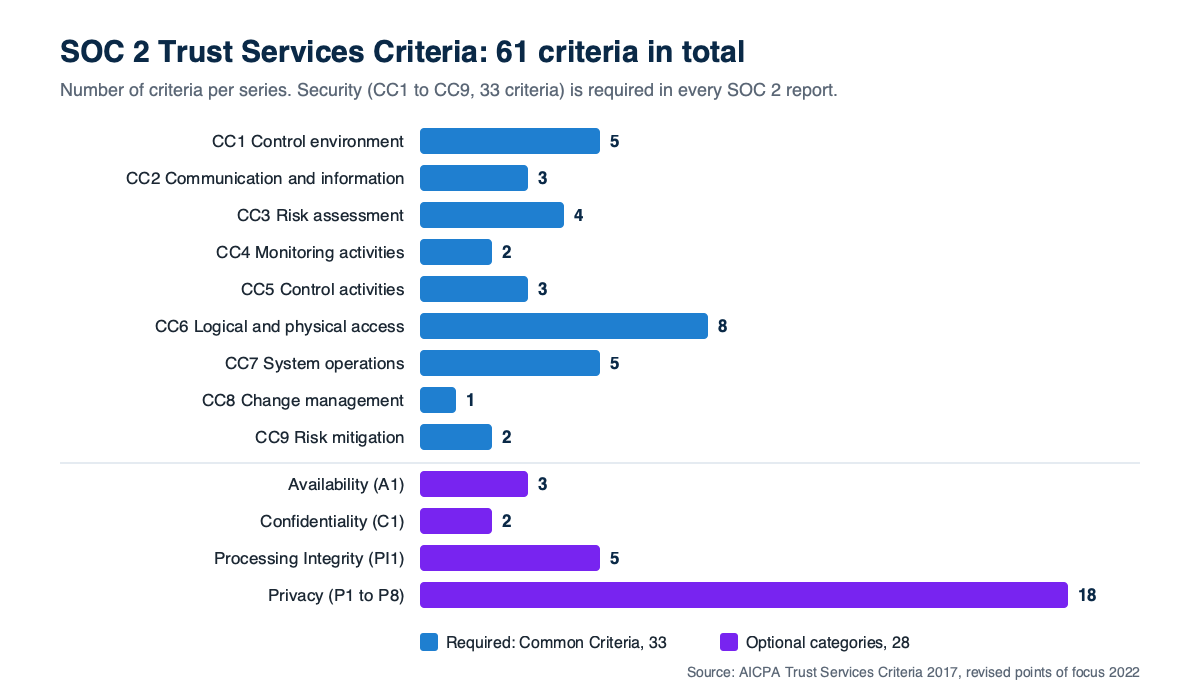
SOC 2 has 61 Trust Services Criteria in total. Security, expressed as the Common Criteria CC1 to CC9, is mandatory in every SOC 2 examination. The other four are optional.
| Trust Services Category | Criteria series | Number of criteria | Required in every SOC 2? |
|---|---|---|---|
| Security (Common Criteria) | CC1 to CC9 | 33 | Yes |
| Availability | A1.1 to A1.3 | 3 | No, optional |
| Confidentiality | C1.1 to C1.2 | 2 | No, optional |
| Processing Integrity | PI1.1 to PI1.5 | 5 | No, optional |
| Privacy | P1 to P8 | 18 | No, optional |
| Total | 61 |
The 33 SOC 2 Common Criteria break down as CC1 control environment (5), CC2 communication and information (3), CC3 risk assessment (4), CC4 monitoring activities (2), CC5 control activities (3), CC6 logical and physical access (8), CC7 system operations (5), CC8 change management (1) and CC9 risk mitigation (2). CC1 to CC5 mirror the 17 principles of the COSO 2013 internal control framework.
This SOC 2 controls list is a starter set for a small SaaS company scoping Security only. Each row names the control, the SOC 2 criteria it supports, how often it runs, and the evidence a SOC 2 auditor will usually ask to see. Adapt each control to how the company really operates.
| # | Control | Criteria | Frequency | Evidence |
|---|---|---|---|---|
| 1 | Code of conduct acknowledged by every employee and contractor | CC1.1 | At hire, then annually | Signed acknowledgements |
| 2 | Leadership reviews security status, risks and open issues | CC1.2 | Quarterly | Meeting minutes or slides |
| 3 | Named security owner, with security duties in job descriptions | CC1.3, CC1.5 | Reviewed annually | Org chart, job descriptions |
| 4 | Background checks before access is granted, where lawful | CC1.4 | At hire | Completion record per new hire |
| 5 | Information security policies approved and published to staff | CC2.2, CC5.3 | Approved annually | Policies with version, date and approver |
| 6 | Security awareness training | CC2.2 | At hire, then annually | Training completion report |
| 7 | Published way for customers to report security issues | CC2.3 | Ongoing | Security page, support process |
| 8 | Security commitments written into customer contracts | CC2.3 | Reviewed annually | Contract template, system description |
| 9 | Risk assessment rating likelihood, impact and treatment | CC3.1, CC3.2 | Annually and on major change | Risk register |
| 10 | Fraud risk considered in the risk assessment | CC3.3 | Annually | Fraud entries in the risk register |
| 11 | Significant business or system changes assessed for new risk | CC3.4 | On change | Risk review notes |
| 12 | Internal review of each control against this list | CC4.1 | Quarterly | Completed review with sign-off |
| 13 | Control gaps tracked to closure with an owner and date | CC4.2 | Ongoing | Issue tracker tickets |
| 14 | Controls selected to address each risk in the register | CC5.1, CC5.2 | Annually | Risk treatment column, this list |
| 15 | Unique accounts and MFA on every in-scope system | CC6.1 | Ongoing | MFA settings, account list |
| 16 | Access requests approved before accounts are created | CC6.2 | Per request | Approved tickets |
| 17 | Access removed within one business day of a leaver's last day | CC6.2, CC6.3 | Per leaver | Offboarding tickets with timestamps |
| 18 | User access reviews of production and key SaaS tools | CC6.2, CC6.3 | Quarterly | Signed review, changes made |
| 19 | Admin and production access limited to named roles | CC6.3 | Reviewed quarterly | Admin user list |
| 20 | Firewall or security group rules restrict network access | CC6.6 | Reviewed quarterly | Rules export |
| 21 | Data encrypted at rest and in transit | CC6.1, CC6.7 | Ongoing | Storage settings, TLS configuration |
| 22 | Laptops with disk encryption, screen lock and malware protection | CC6.8 | Ongoing | Device management report |
| 23 | Devices and media wiped before disposal or reuse | CC6.5 | Per disposal | Wipe or disposal records |
| 24 | Vulnerability scanning, with fixes inside set timeframes | CC7.1 | Monthly scan | Scan reports, patch tickets |
| 25 | Logging and alerting on production systems | CC7.2 | Ongoing | Log retention settings, sample alerts |
| 26 | Incident response plan, tested with a tabletop exercise | CC7.3, CC7.4 | Tested annually | Plan, exercise notes |
| 27 | Incidents logged, investigated and reviewed for root cause | CC7.4, CC7.5 | Per incident | Incident log |
| 28 | Code changes peer reviewed, tested and approved before release | CC8.1 | Per change | Pull request history, branch protection |
| 29 | Vendors risk-assessed at onboarding and reviewed | CC9.2 | Annually | Vendor register, vendor SOC 2 reports |
| 30 | Backups taken and a restore tested, within a business continuity plan | CC9.1, CC7.5 | Daily backups, annual restore test | Backup settings, restore test record |
Physical access, criterion CC6.4, is missing from the starter SOC 2 controls list on purpose. A fully remote company hosting in a public cloud usually relies on the cloud provider's data centre controls and says so in the SOC 2 system description. An office holding production equipment or customer data needs its own physical access controls.
A small team should add an optional SOC 2 category only when customer contracts or service level commitments make it relevant.
| Category | Add it when | Typical extra controls |
|---|---|---|
| Availability (3 criteria) | Contracts promise uptime or a service level | Capacity monitoring, backups, disaster recovery test |
| Confidentiality (2 criteria) | Customers share confidential business data under NDA | Data classification, retention and secure deletion |
| Processing Integrity (5 criteria) | The service calculates or transacts on customers' behalf, such as payroll or payments | Input validation, reconciliations, output review |
| Privacy (18 criteria) | The company collects personal information directly from individuals | Privacy notice, consent, access and deletion requests |
Many first-time SOC 2 reports scope Security alone, or Security plus Availability and Confidentiality. Privacy is the largest optional category, so add it deliberately rather than by default.
SOC 2 Type 2 controls are the same controls as in a Type 1 report. The difference is the testing. A SOC 2 Type 1 report tests whether the controls are suitably designed at a single date. A SOC 2 Type 2 report tests whether the same controls operated effectively across an observation period, commonly 3 to 12 months. For a Type 2 report, the auditor samples records such as tickets, pull requests and leavers from across the whole window. The SOC 2 Type 1 vs Type 2 guide covers which report to get first.
Complementary user entity controls, or CUECs, are controls a service organisation assumes its customers operate for the SOC 2 controls to work as described. CUECs are listed in the SOC 2 report.
Complementary subservice organisation controls work the other way: under the carve-out method, the SOC 2 report lists controls expected at vendors such as the cloud provider. Control 29 in the starter list, reviewing vendor SOC 2 reports, shows the company monitors them.
A SOC 2 controls list only becomes audit-ready when every control has an owner, a frequency and a place where its evidence is stored. A quarterly control needs a record for each quarter in the audit period. The guide to what auditors look for in evidence explains what makes a record acceptable, and the user access review guide walks through one of the most frequently sampled controls in detail.
CertAssist lays out the SOC 2 Trust Services Criteria as a board, with editable policy and evidence templates for each control and read-only access for the auditor. As of November 2026, CertAssist costs US$225 per month on a limited-time launch offer (normally US$375 per month), or US$2,475 per year. CertAssist has no integrations, so it never needs access to a company's cloud or identity provider. The trade-off is that evidence is uploaded by people, not collected automatically. A company with many cloud accounts and hundreds of staff may get more from a platform with automated evidence collection, despite the system access it requires.
A SOC 2 controls list template is not enough when it describes controls the company does not actually run. A control copied from a template and never performed becomes an exception in a SOC 2 Type 2 report. A template also cannot cover Processing Integrity or Privacy well, because those controls depend on how the specific service works. No template or software replaces the independent CPA firm that performs the SOC 2 examination and issues the report.
How many controls does SOC 2 have?
SOC 2 has no fixed number of controls. The AICPA Trust Services Criteria contain 61 criteria: 33 Common Criteria for Security that apply to every SOC 2 report, plus 28 across the optional Availability, Confidentiality, Processing Integrity and Privacy categories. Each company writes its own controls to meet the criteria in scope, so the number of SOC 2 controls varies from one report to the next.
What are SOC 2 Type 2 controls?
SOC 2 Type 2 controls are the same controls described in a Type 1 report, tested differently. A SOC 2 Type 2 auditor tests whether each control operated effectively across an observation period, commonly 3 to 12 months, by sampling records such as access reviews, tickets and pull requests from across that period. A SOC 2 Type 1 report only tests control design at a single date.
Is SOC 2 compliance mandatory?
SOC 2 compliance is not mandatory under any law. SOC 2 is a voluntary attestation standard from the AICPA. In practice, SOC 2 becomes necessary when customers, usually mid-market and enterprise buyers, require a SOC 2 report before signing a contract with a software or service provider. A company whose buyers never ask for SOC 2 can reasonably defer it.
How often should a SOC 2 report be updated?
A SOC 2 report is usually renewed every year. A SOC 2 report does not formally expire, but most buyers expect a report whose period ended within the last 12 months. Companies typically run back-to-back Type 2 periods of 12 months, and issue a bridge letter to cover the gap between the end of the last period and the date the next report is ready.
What are complementary user entity controls in SOC 2?
Complementary user entity controls, or CUECs, are controls a service organisation assumes its customers will operate for the SOC 2 controls to achieve their objectives. A typical CUEC is that customers manage which of their own users can access the application. CUECs are listed in the SOC 2 report so that each customer can confirm its side of the arrangement is in place.
CertAssist lays out every SOC 2 Trust Services Criterion, gives you editable policy and evidence templates for each control, and lets your auditor review it all in one place, for US$225 a month.
See pricing FrameworksFlat $225 a month, or $2,475 a year (12 months for the price of 11). All prices in USD.