Stale access is a top audit finding and a real risk. Here is how to run a clean user access review, with a checklist.
A user access review is a periodic check that every person's access to your systems and data is still appropriate for their role, with anything unnecessary removed. It is one of the most requested controls in SOC 2, ISO 27001 and PCI DSS, because stale access, from leavers, movers and forgotten admin rights, is a common path to a breach. A good review is a simple, repeatable loop: pull who has access to what, have the right owner confirm it is still needed, then revoke what is not and keep the sign-off as evidence. Here is how to run one properly, with a checklist you can use.
A user access review, sometimes called an access recertification, is the process of confirming that each user's access rights to applications, systems and data remain justified by their current role, and removing any that are not. It typically covers who has access to a system, at what privilege level, and whether that still matches their job. The review exists because access tends to accumulate: people change roles, projects end, and temporary permissions become permanent. A review catches that drift on a schedule rather than leaving it to chance.
User access reviews matter because excess access is a direct security risk and a frequent audit finding. An account with more access than it needs is a larger target and a bigger problem if it is compromised, and a former employee who still has a live login is a serious exposure. Reviews reduce that attack surface and prove that you are managing least privilege deliberately. They also matter commercially, because auditors and customers treat a missing or sloppy access review as a signal that other controls may be weak too.
Most major frameworks expect periodic access reviews. SOC 2 looks for them under its access-control criteria, ISO 27001 addresses access rights in its Annex A controls, and PCI DSS requires reviews of access to cardholder data environments. HIPAA expects access to protected health information to be managed and reviewed, and NIST-based programs such as CMMC include access recertification. The wording differs, but the underlying expectation is the same across the board: prove that access is granted on need, and re-checked regularly.
Quarterly is the common cadence for user access reviews, and it satisfies most frameworks and auditors for systems holding sensitive data. Lower-risk systems may be reviewed twice a year, while highly sensitive or heavily regulated environments may warrant monthly checks. Beyond the scheduled cycle, run an event-driven review whenever someone leaves or changes role, because that is when inappropriate access is created. Whatever cadence you choose, apply it consistently and document it, because an auditor cares as much about the pattern as the individual review.
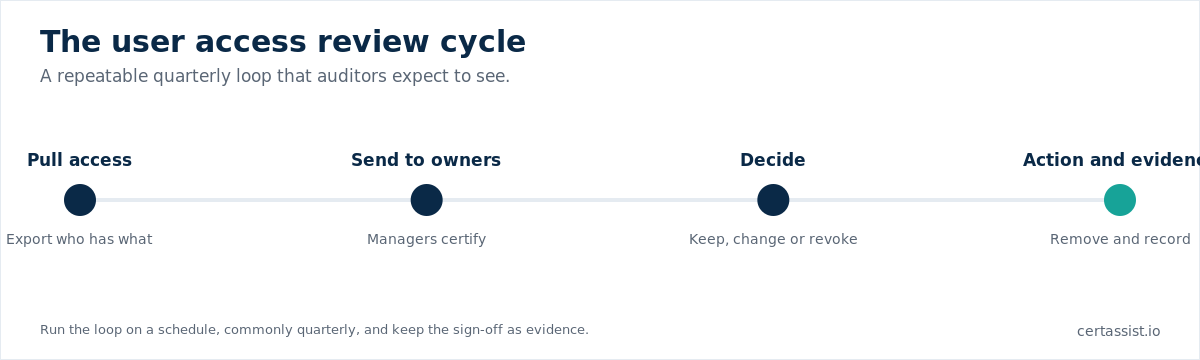
To run a user access review, first export the current access for the system in scope, showing each user and their privilege level. Send that list to the person who genuinely knows whether the access is needed, usually the system owner or the user's manager, not IT alone. Ask them to mark each entry keep, change or revoke, with a reason for anything unusual such as admin rights. Action the changes promptly, then capture the completed sign-off, the before and after, and the date as evidence. That evidence is what an auditor will ask to see.
Use this checklist each cycle so nothing is missed:
You do not necessarily need dedicated user access review software, especially with a handful of systems, where a careful spreadsheet-and-email process works if it is done consistently and the evidence is kept. Dedicated tools and identity-governance platforms help at larger scale by pulling access automatically and chasing sign-offs, which saves time when you have many systems and reviewers. The deciding factor is scale and how much manual effort you can sustain. What matters to an auditor is not the tool but the discipline: reviews on a schedule, real owners deciding, changes actioned, evidence kept.
CertAssist gives you the access-review control laid out with an editable template and a place to attach each cycle's evidence, so the review sits alongside every other control an auditor will examine rather than living in a lost spreadsheet. You run the review in your own systems, then record the sign-off and outcome in CertAssist as proof for SOC 2, ISO 27001, PCI DSS or another framework. CertAssist does not connect to your systems, so it never holds your access data itself, and the price is a published US$225 per month during its launch.
A user access review is a periodic check that each person's access to systems and data still matches their current role, with anything unnecessary removed. It confirms who has access, at what privilege level, and whether that remains justified. Reviews catch access that accumulates over time from role changes, ended projects and forgotten temporary permissions.
Quarterly is the common cadence and satisfies most frameworks and auditors for sensitive systems. Lower-risk systems may be reviewed twice a year, and highly sensitive ones monthly. Beyond the schedule, run an event-driven review whenever someone leaves or changes role, since that is when inappropriate access is created. Apply your cadence consistently and document it.
A user access review lists each system in scope, exports its users and privilege levels, flags privileged, shared and service accounts, and has the owner or manager certify each entry as keep, change or revoke. You cross-check against leavers and movers, action changes promptly, and record the sign-off, the changes and the date as evidence for auditors.
Not necessarily. With a few systems, a consistent spreadsheet-and-email process works if the evidence is kept. Dedicated tools and identity-governance platforms help at larger scale by pulling access automatically and chasing sign-offs. What auditors care about is the discipline: reviews on a schedule, real owners deciding, changes actioned, and evidence retained, not the specific tool.
Most major frameworks expect them. SOC 2 covers them under access control, ISO 27001 addresses access rights in Annex A, and PCI DSS requires reviews of access to cardholder data. HIPAA expects managed and reviewed access to health information, and NIST-based programs such as CMMC include access recertification. The wording varies, but the expectation to grant access on need and re-check it regularly is universal.
CertAssist lays out the access-review control with an editable template and a home for each cycle's evidence, for a published $225 a month during the launch.
See pricing FrameworksFlat $225 a month during the launch, normally $375, or $2,475 a year (12 months for the price of 11). All prices in USD.